

Getting traffic from Google is one of the most valuable things a WooCommerce store can do. A visitor who finds your store through search is already looking for what you sell. Paid advertising stops the moment you pause the budget. Organic traffic compounds over time.
This guide covers every step of WooCommerce SEO in a practical, structured way — whether you run a small store with 50 products or a large catalogue with thousands of SKUs, whether you sell locally or ship internationally. Follow the steps in order for the strongest foundation.
Step 1: Set Up the Right SEO Plugin and Tracking
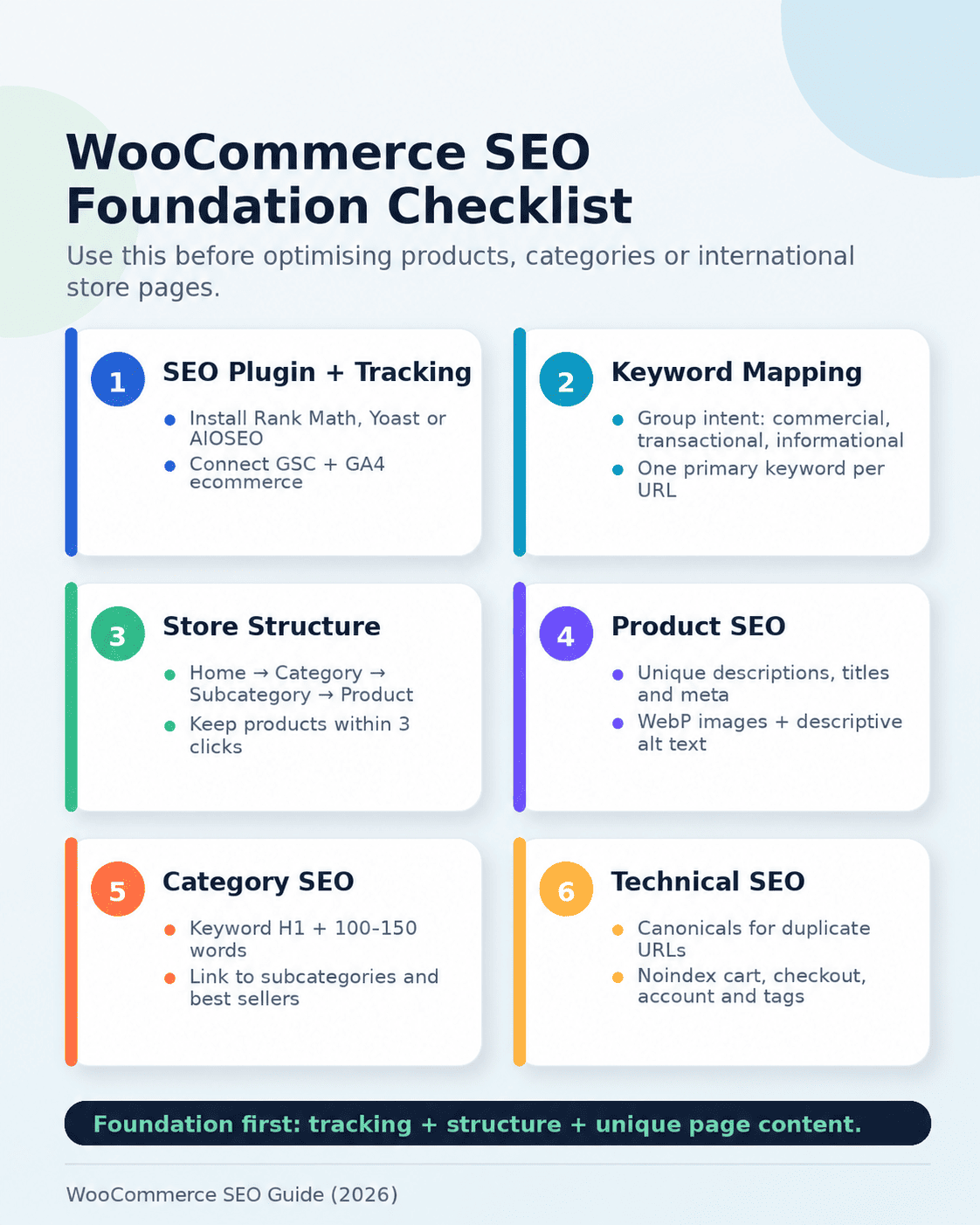
Before optimising a single product title or meta description, you need the right tools configured. Getting this step right saves significant time later.
Choose Your SEO Plugin
Three plugins handle WooCommerce SEO well, and the right choice depends on your budget and technical comfort:
Rank Math is the best choice for most stores. The free version includes WooCommerce product schema, canonical tag management, XML sitemap generation, redirect management, and keyword tracking — features that Yoast charges for in its premium tier. For stores on a tight budget, Rank Math offers the most value without paying.
Yoast SEO is the most established option and is beginner-friendly. The free version covers the basics well. Full WooCommerce product schema support requires the paid WooCommerce add-on. It is a strong choice for teams already familiar with Yoast across other WordPress sites.
AIOSEO is a solid middle option with a clean interface and good WooCommerce integration. The free version includes more WooCommerce-specific features than Yoast’s free tier.
Connect Google Search Console
Search Console is where Google reports what it knows about your site — which pages are indexed, which queries are driving impressions, and where technical problems exist. Go to Google Search Console and add your store as a property.
- Add your store URL as a property in Search Console
- Verify ownership via your DNS provider or by adding the HTML tag through your SEO plugin
- Submit your sitemap URL once it is generated (covered in Step 6)
Check Search Console every two weeks. It shows crawl errors, manual actions, Core Web Vitals scores, and the queries people are using to find your pages — all of which directly inform your next optimisation actions.
Set Up Google Analytics 4 with Enhanced Ecommerce
Standard GA4 installation does not track ecommerce events. You need enhanced ecommerce tracking to see which products are being viewed, added to cart, and purchased from organic search. The WooCommerce Google Analytics integration plugin configures this automatically. Without it, you cannot measure whether your SEO work is driving revenue — only traffic.
Step 2: Keyword Research for WooCommerce Stores
Most stores either skip keyword research or treat it as a one-time task. The result is pages optimised for terms nobody searches for, while high-value queries go untargeted. Keyword research is the foundation that makes every other step more effective.
Understand Search Intent First
Before looking at search volumes, understand what type of query each page should target. WooCommerce stores deal with three main intent types:
- Commercial intent — shoppers comparing options: “best wireless earphones under £50”, “lightweight running shoes for wide feet”
- Transactional intent — shoppers ready to buy: “buy Sony WH-1000XM5”, “order leather wallet online free delivery”
- Informational intent — shoppers researching: “how to choose running shoes”, “types of leather wallet”
Category pages should target commercial and transactional terms. Product pages go after specific transactional queries. Blog content targets informational queries and links back to categories and products.
Finding the Right Keywords
Use Google Keyword Planner to check search volumes in your target market. Set the location to the country or region you are targeting — volumes differ significantly between markets.
For each major product category, build three tiers of keywords:
- Broad category keywords — go on category pages. Examples: “men’s running shoes”, “leather wallets”, “wireless headphones”
- Long-tail buying keywords — go on product pages. Examples: “slim bifold leather wallet RFID protection”, “Sony over-ear noise cancelling headphones”
- Local or geo-specific keywords — go on landing pages or localised category pages. Examples: “running shoes London free delivery”, “leather goods store New York”
Assign one primary keyword per page. If two pages target the same keyword, they compete with each other and neither ranks well — this is keyword cannibalisation, and it is one of the most common problems in growing stores.
Targeting International Markets
If your store ships internationally or targets multiple countries, keyword research becomes more complex. Search volumes, terminology, and buying behaviour differ between markets.
- Use Google Keyword Planner with location filters to check volumes per country
- Note terminology differences: “trainers” (UK) vs “sneakers” (US), “mobile” (UK/AU) vs “cell phone” (US)
- Use Google Search Console to see which countries are already sending traffic — this reveals market opportunities you may not have planned for
- Consider hreflang tags and separate URL structures for multilingual stores (covered in Step 9)
Step 3: Set Up the Right Site Structure
How your store is organised determines how much of it Google will crawl and how ranking authority flows through your pages. A clean structure benefits both search engines and shoppers.
The ideal hierarchy is: Home → Category → Subcategory → Product
Every product should be reachable within three clicks from the homepage. Products buried deeper than three levels receive less crawl attention and less ranking authority from the pages above them.
URL Structure
WooCommerce lets you control the slug for every category and product. Use this to create URLs that are short, readable, and keyword-relevant.
- Good: yourstore.com/mens-leather-wallets/slim-bifold-brown
- Bad: yourstore.com/product-category/products/item?id=4872
Go to Settings → Permalinks in WordPress and choose the Post name option. This removes the /product-category/ prefix that WooCommerce adds by default, giving you cleaner URLs.
Breadcrumbs
Enable breadcrumbs in your WooCommerce theme or through your SEO plugin. They help users navigate back to categories, and they unlock BreadcrumbList schema, which shows the full page path in Google search results — giving your listing additional visibility without any change in ranking position.
Category and Tag Pages
WooCommerce creates separate archive pages for both categories and tags. Category pages are among your most valuable SEO assets — they rank for broad, high-volume terms and bring in shoppers at the exploration stage. Tag archives, in most cases, produce thin or duplicate content that wastes crawl budget.
Set WooCommerce tag archives to noindex in your SEO plugin settings. Keep category pages indexed and optimised.
Step 4: Optimise Your Product Pages
Product pages have two jobs: rank in Google and convert the visitors who arrive. Both goals are served by the same optimisation work.
Product Titles
The product title is the H1 heading on the page. It should include the primary keyword naturally and be specific enough to match what someone would type into Google. Avoid vague titles that describe a category rather than a specific product.
Weak: Running Shoes
Strong: Men’s Lightweight Trail Running Shoes — Breathable Mesh, Sizes 6–13
Product Descriptions
Copying descriptions from suppliers or manufacturers is the most common SEO mistake across ecommerce stores globally. Google finds those same descriptions on dozens or hundreds of other sites and has no reason to rank yours above them.
Write original descriptions for every product. A useful structure:
- What the product is and its primary purpose — one clear sentence
- Two or three specific features that matter to the buyer, not a full spec list
- Who it suits — the use case or type of person it is made for
- One practical benefit that connects a feature to an outcome
Keep descriptions between 80 and 200 words. The short description field in WooCommerce appears next to the product image, especially on mobile — populate it with a concise, keyword-containing summary. Many stores leave it blank.
Meta Titles and Descriptions
Meta titles and descriptions control what appears in Google search results. They affect whether someone clicks your listing or a competitor’s. Every product page needs a unique meta title and description — never leave them auto-generated or blank.
| Element | Strong Example | Weak Example |
| Meta Title | Men’s Brown Leather Wallet – Slim RFID | StoreName | Product 47 | StoreName |
| Meta Description | Genuine leather slim wallet, RFID protection, 6 card slots. Free shipping on orders over $50. | Best quality wallet. Buy now at a great price. |
| Length | Title ≤60 chars, description ≤160 chars | Cuts off mid-sentence in results |
Product Images
Image optimisation is consistently overlooked yet affects both page speed and Google Images rankings. Three things to do for every image:
- Rename files before uploading: brown-leather-slim-wallet-men.jpg not IMG_4821.jpg
- Write descriptive alt text: “Men’s brown leather slim wallet with RFID protection” — one clear sentence, not a keyword list
- Compress to under 150 KB: use Squoosh or TinyPNG. Use WebP format where your theme supports it — typically 25–35% smaller than JPEG at the same quality
Step 5: Optimise Category Pages
Category pages are the primary traffic drivers in most WooCommerce stores. They rank for broad, high-volume commercial keywords — the terms shoppers use when they are exploring options rather than looking for a specific product. Despite this, most store owners focus all their content effort on product pages and leave category pages almost empty.
A well-optimised category page needs:
- A unique H1 heading that matches the search query. “Men’s Running Shoes” not “Products” or “Category 3”.
- A short description (100–150 words) above or below the product grid. Add this in WooCommerce from Products → Categories → category description field. It gives Google meaningful content to index and helps the page rank for the category’s target keyword.
- Optimised meta title and description — the same rules as product pages apply here.
- Internal links to subcategories and featured products — helps distribute crawl authority and guides shoppers to relevant sections.
- Breadcrumb navigation — already enabled from Step 3, but confirm it appears correctly on category pages.
Step 6: Fix the Technical SEO Problems WooCommerce Creates
WooCommerce introduces several technical SEO problems by default. They do not require advanced knowledge to fix, but left unaddressed they quietly suppress rankings across your entire store.
Duplicate Content
The most common WooCommerce duplicate content issue occurs when the same product appears in multiple categories, generating two different URLs for the same page:
- yourstore.com/accessories/mens-leather-wallet
- yourstore.com/gifts/mens-leather-wallet
Google sees these as separate pages with identical content. The fix is canonical tags — set on the duplicate URLs to point to the primary version. In Rank Math, enable canonical URLs for products under WooCommerce Settings. Yoast handles this through its Advanced settings. Once set, Google consolidates ranking signals to the canonical URL.
Paginated Category Pages
Category pages that span multiple pages (/page/2/, /page/3/) can create indexing confusion. Ensure paginated pages either canonical-ise to the main category page or use proper next/prev link tags. Your SEO plugin handles this if configured correctly.
Noindex Pages That Should Not Appear in Search
WooCommerce creates functional pages that should never appear in Google search results. Set these to noindex in your SEO plugin:
- Cart page
- Checkout page
- My Account page and sub-pages
- Order received / thank you pages
- Product tag archive pages (unless actively targeting tag-level keywords)
XML Sitemap
Rank Math generates a sitemap automatically at yourstore.com/sitemap_index.xml. Configure it to include product and category pages, and exclude the noindex pages listed above. Submit the sitemap URL in Google Search Console under the Sitemaps section.
Check the sitemap report in Search Console after one to two weeks. It shows how many URLs were submitted versus how many Google indexed. A large gap between the two numbers points to duplicate content, crawl errors, or noindex tags applied to pages you intended to rank.
Page Speed and Core Web Vitals
Page speed is a Google ranking factor and has a direct effect on conversion rates. Slow stores lose both rankings and sales.
Four changes produce the biggest improvements for WooCommerce stores:
- Use managed WordPress hosting — shared hosting on entry-level providers creates a hard ceiling on performance. Cloudways and WP Engine are reliable options used by ecommerce agencies including Thanksweb’s web development team.
- Install a caching plugin — WP Rocket or LiteSpeed Cache are the most effective options for WooCommerce.
- Compress all images before upload. A store with 1,000 products and uncompressed images can reduce total page weight by several megabytes per page with this single step.
- Use a CDN to serve static files from servers closer to your visitors. Cloudflare’s free plan covers most stores. For stores with significant traffic outside your hosting region, a CDN makes a measurable difference to load times.
Measure your current performance at Google PageSpeed Insights. Focus on the mobile score first — mobile is where most ecommerce traffic arrives. Scores below 50 need attention before other optimisations will reach their full potential.
Step 7: Add Schema Markup for Rich Results
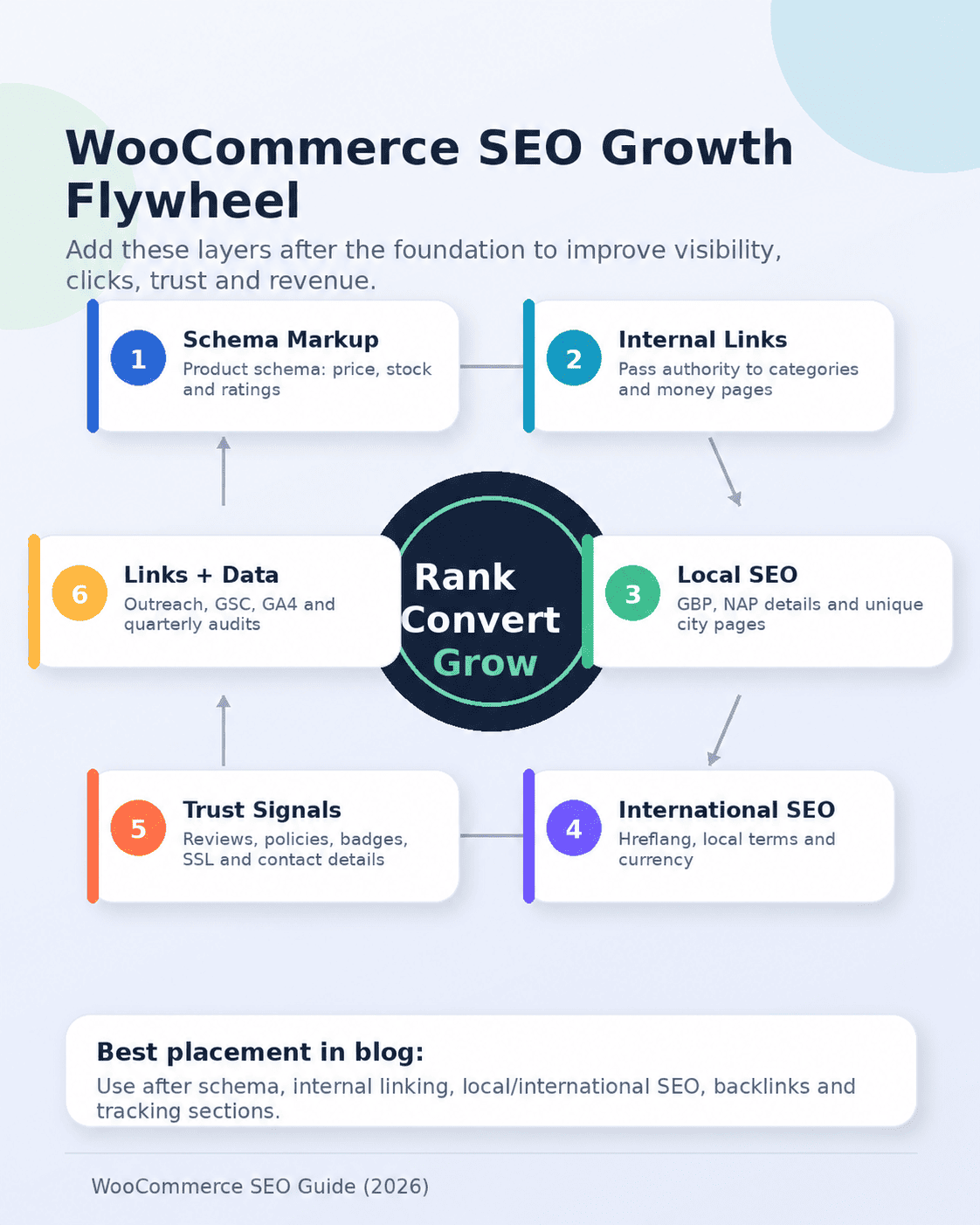
Schema markup is structured code that tells Google what type of content is on your page. For WooCommerce stores, the right schema types unlock rich results in Google search — listings that show product price, star ratings, availability, and breadcrumbs directly in the results page. These richer listings attract more clicks without any change in ranking position.
Rank Math adds Product schema to every WooCommerce product automatically when it detects WooCommerce is active. Yoast requires its WooCommerce add-on for the same functionality. Once set up, verify it is working by pasting any product URL into Google’s Rich Results Test.
| Schema Type | What It Unlocks in Google | Where to Apply |
| Product | Price, availability, star ratings in results | All product pages |
| BreadcrumbList | Full page path shown under the page title | All pages |
| Organization | Brand name, logo, and contact info in Knowledge Panel | Homepage |
| FAQPage | Expandable Q&A directly in search results | FAQ and help pages |
| AggregateRating | Star rating display for products | Product pages with reviews |
Step 8: Build an Internal Linking Structure
Internal links serve two purposes: they help Google discover pages it might otherwise miss, and they transfer ranking authority from stronger pages to weaker ones. In a store with thousands of products, a well-planned internal linking structure is one of the highest-return SEO tasks you can do.
- Blog to product and category links — Every blog post about a product topic should link to the relevant category or product page using descriptive anchor text. A post on “how to choose the right running shoe” should link to the running shoes category using anchor text like “men’s trail running shoes”, not “click here”.
- Related Products, Upsells, and Cross-sells — WooCommerce’s built-in sections create automatic internal links across your catalogue. Populate these thoughtfully based on actual product relevance, not random assignments.
- Homepage to key category pages — The homepage holds the most authority of any page on your site. It should link directly to your most important category pages. Categories only reachable through multiple clicks receive less crawl attention and rank more slowly.
- Category pages to subcategory pages — Add visible links from broad category pages to their subcategories. This distributes authority down the hierarchy and helps shoppers navigate.
Use Screaming Frog’s free version to crawl your site and identify pages with no internal links pointing to them. These orphaned pages are the most likely to rank poorly regardless of how well they are individually optimised.
Step 9: Local and International SEO for WooCommerce
Most WooCommerce stores serve either a specific geographic area or an international audience. The SEO approach differs significantly between the two — and many stores that serve both handle neither well.
Local SEO for WooCommerce Stores
If your store has a physical presence or serves a defined geographic area, local SEO creates a meaningful competitive advantage. Set up a Google Business Profile for your store — complete every field including categories, service areas, opening hours, and photos. This enables your store to appear in Google Maps results and local pack listings.
Add your store’s address and contact details to your website footer and create a dedicated Contact page. Google uses consistent name, address, and phone number (NAP) information across your site and your Business Profile to understand your service area.
For stores serving multiple cities, consider creating unique landing pages or category page variants per city. Keep content unique per page — do not copy the same description across location pages. A page for “running shoes in Manchester” and one for “running shoes in Birmingham” must each have distinct, useful content to rank independently.
International SEO with Hreflang
If your store targets multiple countries or languages, hreflang tags tell Google which version of a page to serve to which audience. Without them, Google may show the wrong language version to international visitors or consolidate rankings incorrectly.
The hreflang setup for WooCommerce depends on your URL structure:
- Separate domains (store.co.uk / store.com.au) — simplest structure; each domain is treated as a separate entity
- Subdirectories (yourstore.com/uk / yourstore.com/au) — most practical for most stores; maintains domain authority while separating content by market
- Subdomains (uk.yourstore.com) — works but is harder to manage and distributes authority less efficiently than subdirectories
Rank Math and AIOSEO both support hreflang tag configuration. For stores running WooCommerce in multiple languages, the WPML plugin integrates with both WooCommerce and Rank Math to handle hreflang automatically.
Terminology and Currency Differences Across Markets
Keyword research must be done per market, not just per language. Even between English-speaking countries, terminology varies in ways that affect search volume significantly:
| Search Term | Where It Applies |
| Sneakers / Athletic shoes | United States, Canada |
| Trainers / Sports shoes | United Kingdom, Australia |
| Turnschuhe | Germany (German-language markets) |
| Mobile phone | United Kingdom, India, Australia |
| Cell phone | United States, Canada |
| Shipping / Postage / Delivery | Varies by market — check local usage |
Running the same keyword in Google Keyword Planner with different location filters reveals these differences quickly. Targeting the local terminology rather than generic terms produces significantly better results in each market.
Trust Signals That Support Conversions Globally
Shoppers everywhere have trust concerns with unfamiliar online stores. Pages that clearly display trust information reduce bounce rates and increase time-on-site — both of which signal to Google that your pages are satisfying visitor intent.
Include on your product pages and throughout your store:
- Clear return and refund policy — linked from product pages, not buried in the footer
- Verified customer reviews with dates — recent reviews carry more trust than old ones
- Recognised payment method badges relevant to your market (Visa/Mastercard globally; PayPal, Apple Pay, local options)
- SSL certificate — this is a baseline requirement, not optional
- Business registration or contact details in the footer — reduces anonymous-store concern
Step 10: Backlink Building for WooCommerce Stores
Backlinks remain one of the strongest ranking signals. A link from a trusted external website to your store tells Google your site is credible. For ecommerce stores, quality matters more than quantity — one link from a relevant, high-authority site outperforms dozens of directory listings.
These approaches produce consistent results across markets:
- Product reviews on niche blogs and publications — Reach out to bloggers, content sites, and YouTubers in your product category. Offer a sample in exchange for an honest review. A single mention on a relevant site with genuine audience carries more SEO weight than many generic links.
- Guest posts on industry blogs — Write genuinely useful content for established blogs in your niche. The post should stand on its own as useful content, not act as a promotional piece with a link inserted.
- Original research and data — Publish findings about your market or product category. “We analysed 5,000 orders and here is what buyers prioritise in [category]” earns natural links because other sites and journalists cite original data.
- Supplier and partner link opportunities — Many brands and suppliers have “where to buy” pages or authorised retailer lists. If you stock their products, ask to be listed.
- Industry directories and aggregators — List your store on relevant directories for your market and product category. The value varies, but consistent presence across reputable directories reinforces trust signals.
The Thanksweb ecommerce SEO team includes link building as part of its store growth process — it is one of the areas where professional support pays back most quickly because outreach takes consistent time that most store owners do not have.
Step 11: Track What Is Actually Working
SEO without measurement is guesswork. The goal is to make a change, measure the effect, and decide what to do next based on what the data shows. These are the metrics worth tracking monthly:
| Metric | What It Tells You | When to Act |
| Organic traffic | How many visitors arrive from Google | Sudden drops point to technical issues or algorithm updates |
| Keyword rankings | Where your pages appear for target terms | Falling ranks often mean content quality or duplicate content issues |
| Crawl errors | Pages Google tried but could not load | Fix 404 errors and broken redirects immediately |
| Organic conversions | How many organic visitors complete a purchase | Low conversion with high traffic means product pages need improvement |
| Core Web Vitals | Page experience score | Failing scores directly limit mobile rankings |
| Indexing coverage | How many pages Google has indexed | Large gap between submitted and indexed signals duplicate content |
Google Search Console provides organic traffic, impressions, and crawl data at no cost. GA4 provides conversion and revenue data. Use both together — impressions and clicks from Search Console, and on-site behaviour and revenue from GA4.
Run a full technical audit every three months using Screaming Frog or Ahrefs. WooCommerce stores accumulate broken links, missing meta data, and orphaned pages over time. Regular audits catch these before they compound.
For a structured audit with a prioritised action plan, the SEO team at Thanksweb runs WooCommerce-specific technical audits for stores of all sizes.
Frequently Asked Questions
Technical fixes — resolving duplicate content, configuring schema, improving page speed — can show measurable results within 4 to 8 weeks. Ranking improvements for competitive keywords typically take 3 to 6 months. Content and link building strategies compound over 6 to 12 months. New stores without existing domain authority take longer than established ones.
No. Rank Math’s free version covers everything most stores need — product schema, canonical URLs, XML sitemaps, and meta data management. Upgrade only when you need features like advanced multi-keyword tracking or content AI suggestions.
You can handle the basics — meta titles, URL structure, image optimisation, and sitemap submission. Technical work like canonical tag management, crawl budget optimisation, hreflang configuration, and schema verification is harder to get right without experience. For stores with more than a few hundred products, the volume of work involved in a proper setup usually makes professional support more cost-effective.
Use hreflang tags to tell Google which page to serve to which language/country audience. Your URL structure matters — subdirectories (yourstore.com/de/ for German) are the most practical approach for most stores. The WPML plugin integrates with WooCommerce and Rank Math to manage hreflang automatically across a multilingual catalogue.
Copied product descriptions. The majority of stores — regardless of market — use manufacturer copy or duplicate descriptions across product variants. Google does not rank thin, duplicated content. Writing original descriptions for your top-selling products is the single highest-return content task available to most stores.
Yes, on both counts. Google uses Core Web Vitals as a ranking signal — stores with poor page experience scores are actively limited in mobile rankings. On the conversion side, research consistently shows that each additional second of load time reduces conversion rates. The combination means that a faster store both ranks higher and converts the traffic it gets more effectively.
Go to Google Search Console and open the Enhancements section. It shows which schema types Google has detected and flags any errors. You can also test any product URL directly in Google’s Rich Results Test for an immediate breakdown of what schema Google can read.
Conclusion
WooCommerce is a flexible and capable platform for any size of online store. The stores that rank well and grow consistently are the ones that treat SEO as an ongoing process rather than a one-time setup.
Start with the foundation: install the right SEO plugin, connect Search Console, and fix your site structure. Work through product page optimisation, category pages, technical fixes, and schema. The local and international layers — hreflang, geo-specific keywords, and trust signals — are where you build sustainable advantages that larger or less-focused competitors have not invested in.
None of this is technically complicated. It is detailed, and it requires consistent effort. But the results compound in a way that paid advertising never does.
If you need a team to manage the technical side, run a store audit, or build out an ongoing SEO strategy, Thanksweb’s ecommerce SEO services cover the full range of WooCommerce optimisation. View the SEO packages or get in touch to discuss your store’s specific situation.

Kishan Jadav is the Project Manager of Thanksweb Marketing Pvt. Ltd. With expertise in Technical SEO, Local SEO, web development, and digital strategy, he helps businesses boost online visibility, organic traffic, and leads through data-driven marketing.