
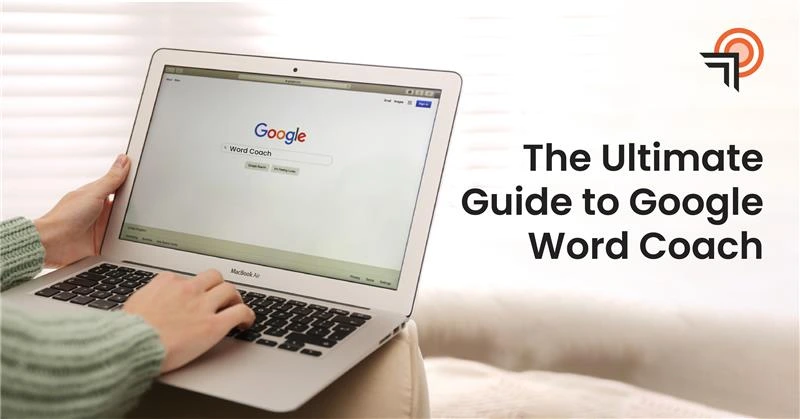




Google Word Coach is one of those features that many discover accidentally. After trying it, it usually becomes part of their everyday learning routine. It involves engaging, fast-paced vocabulary practice through short lessons and game-like questions. This helps people learn words without becoming bored or feeling pressured.
It works well for students, those with upcoming exams, English learners, and anyone looking to expand their English vocabulary. The best part is that it operates as an inbuilt part of Google Search.
This guide explains Google Word Coach: what it is, how it works, how to use it effectively, who should use it, its advantages and limitations, tips for using it, its relationship to search results, and its role in online education today.
What Is Google Word Coach?
Google Word Coach is an easy quiz application integrated into Google Search to help users learn words. It displays short multiple-choice questions on the search page rather than redirecting you to another site or app.
It covers:
- Word meanings
- Synonyms and antonyms
- How words are used in sentences
- Building your vocabulary step by step
It is more of a game than a serious study, which is why people enjoy it and continue using it.
When Was the Google Word Coach Launched?
Word Coach was launched by Google at the beginning of 2018. It was introduced silently as one of the approaches that Google used to enable people to learn through search.
It was not a big announcement or press release. It began as an experimental feature that appeared when users searched for word-related topics.
It initially appeared more in countries such as India and other locations where the majority of the population are English-as-a-second-language learners. Google later released it in other territories, enhanced the questions, and optimized it for mobile devices.
Such a silent release is in Google’s tradition: experiment with real users, find out what works, and refine with real-world use.
Read more about the most discussed Google AI mode and how it works.
If you need more than that guide to feature your brand in the Google AI overview, Thanksweb is the best marketing agency offering AI SEO services that help brands feature in AI overviews.
Why Google Introduced Word Coach?
Word Coach is not an independent learning product developed by Google. It was through observing how individuals currently search Google to find word meanings.
Addressing Everyday Vocabulary Search Behavior
A lot of individuals visit Google each day in search of the meaning of words, their synonyms, or how to use a word. This is done by students, job hunters, and those who do not speak English as their mother tongue. Word Coach makes it a habit to run these quick searches, gradually enhancing vocabulary.
Reducing Friction in Language Learning
The majority of the learning tools require downloading of the app, creating an account, and allocating time to study. Google introduced Word Coach in order to eliminate those steps. It is possible to train vocabulary directly on the search results, without leaving the page and without any commitment.
Making Learning Feel Light, Not Academic
The study of vocabulary can feel heavy when performed through books or long lists. Word Coach is simple and easy through game-like questions in a very short format. This helps users exercise more frequently and recall words.
Supporting Mobile-First Learners Globally
Google developed the Word Coach primarily to suit mobile phones, particularly in regions where the majority of the population has access to smartphones, to help them learn. This aligns with Google’s mission to make education accessible to all.
Aligning with Google’s Broader Learning Vision
At its core, Word Coach shows that Google wants search to do more than just show information. It turns search into an active learning tool—one small question at a time.
How Google Word Coach Works
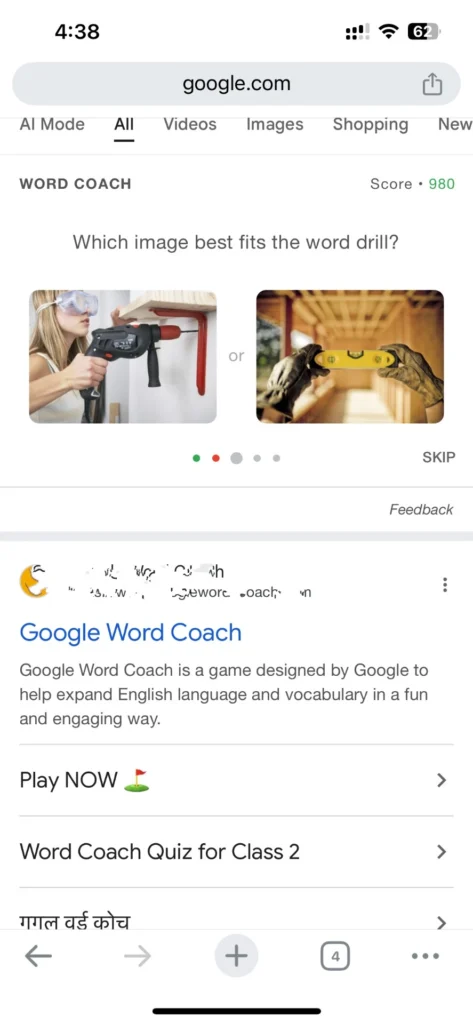
Google Word Coach is an interactive vocabulary quiz that appears inside Google Search. It starts automatically when Google sees you are searching for word help or English practice.
Step 1: Detection of Learning Intent
Google spots certain searches as learning-related rather than regular information searches.
- Searches for word meanings, synonyms, or vocabulary practice
- Terms like English learning or word quizzes
- Common exam vocabulary searches
When it detects this, Word Coach appears in the results.
Step 2: Display of Interactive Quiz Cards
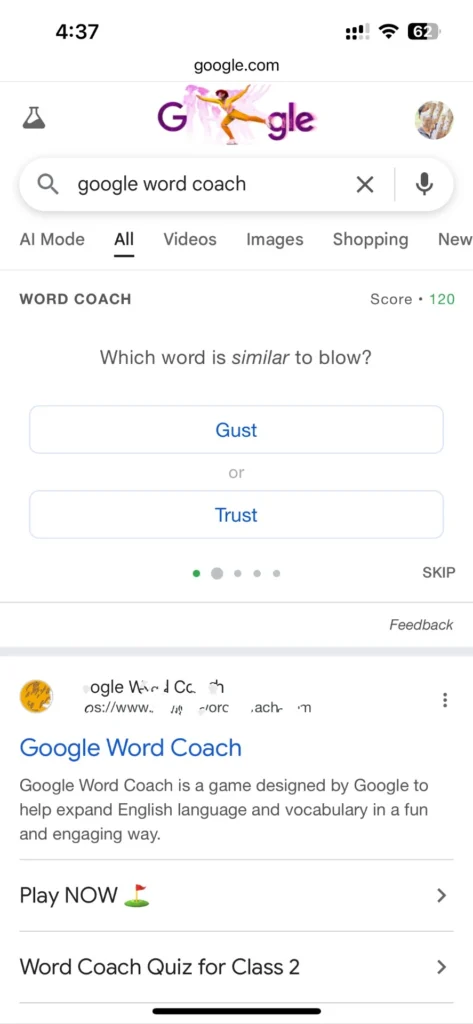
Google shows quiz cards in the search results instead of just links. Each card has one question to keep it fast and simple.
- One question per card
- Two answer choices
- Easy to tap on mobile
You answer without leaving Google.
Step 3: Instant Answer Validation and Explanation
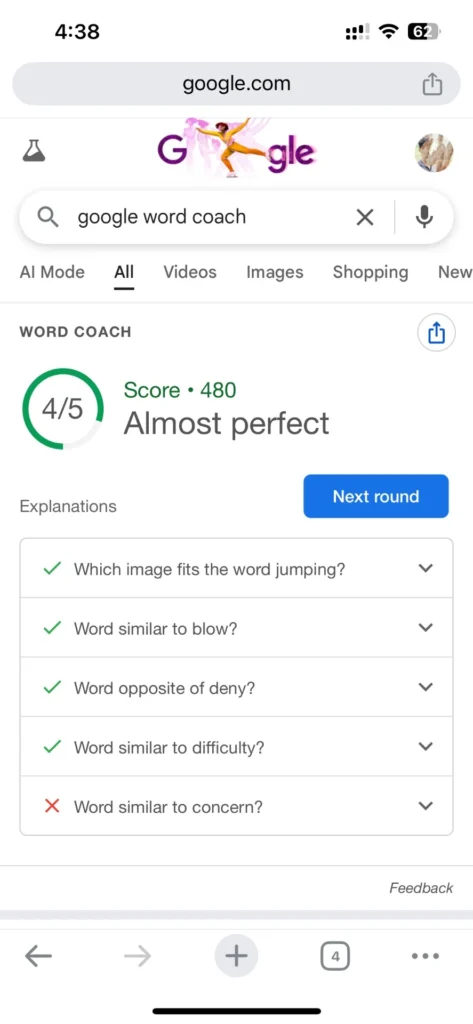
When you have chosen the answer, Google will instantly tell you whether it is right or wrong and provide a brief definition of the word or its usage.
- Correct or incorrect shown right away
- Brief explanation to help you understand
- No page reload
Learning happens instantly.
Step 4: Automatic Progression to Next Question
After feedback, the next question appears automatically. No need to click anything.
- Questions flow one after another
- Mix of meaning, synonym, and usage questions
- Some words repeat to help you remember
It continues as long as you keep going.
Step 5: Passive Adaptation Over Time
Google does not show scores or levels, but it quietly adjusts questions based on your answers. This introduces new terms and reviews existing ones.
- No visible score
- Difficulty changes naturally
- No pressure to perform
Step 6: No Account, No App, No Setup
You do not need to sign in, download anything, or set up an account. It works completely inside Google Search.
- No Google account needed
- No app to install
- Ready instantly on the right searches
How to Access Google Word Coach
Google Word Coach has no separate app or website. You reach it through normal Google Search when certain conditions are met. Knowing the right searches helps it appear more often.
Use Specific Search Queries
The easiest way to trigger it is to search for vocabulary-related terms.
- Try “Google Word Coach,” “vocabulary quiz,” or “English vocabulary practice.”
- Searches for word meanings or synonyms often work
- Exam vocabulary searches can also bring it up
Access It on Mobile Devices
Word Coach works best on phones, especially Android devices, where Google Search is built in.
- Performs well in a mobile browser or the Google app
- Less reliable or missing on the desktop
Scroll Within Search Results
It may not appear at the top. Scroll down a bit to find the quiz cards mixed in with other results.
- Look for tappable quiz cards, not regular links
- Tap to start answering
No Login or Installation Required
No setup is needed. When it appears, you can use it right away.
- No sign-in required
- No download needed
- Starts immediately
Availability May Vary by Region
It may not show everywhere due to location, language settings, or Google updates. If it does not appear, try different word-related searches.
Is Google Word Coach Available on Desktop?
Google designed Word Coach mainly for mobile.
However:
- Some users see it sometimes on desktop
- It works best with touch screens
- Desktop support is not consistent
Use mobile for the smoothest experience.
Languages Supported by Google Word Coach
At present, Google Word Coach mainly supports:
- English
There have been small tests with:
- Hindi prompts for English learners
- Adjustments for non-native speakers
English is still the primary language.
Types of Questions in Google Word Coach
Word Coach works with various categories of questions to make you actually learn words, rather than memorize them. They practice a skill in each type and it makes it interesting.
Word Meaning Questions
These ask what a word means. You choose the correct definition from two options.
- Builds basic understanding
- Includes common or confusing words
- Creates a strong foundation
Synonym-Based Questions
These ask for a word with the same or similar meaning. This helps you use different words in different situations.
- Expands your word choices
- Useful for exams, writing, and work
- Improves flexible language use
Antonym or Opposite Meaning Questions
These ask for the word with the opposite meaning. They help you see clear differences between words.
- Improves contrast understanding
- Prevents word mix-ups
- Makes your language more accurate
Contextual Usage Questions
These put the word in a sentence and ask which word fits best. They teach real-life use.
- Builds practical skills
- Improves reading and understanding
- Shows how words work in sentences
Confusing Word Pair Questions
These focus on words that sound similar or get mixed up often. They help avoid common errors.
- Targets frequently confused words
- Reduces mistakes
- Improves accuracy in speaking and writing
Why Google Word Coach Is Effective?
Microlearning Advantage
Each session takes less than 10 seconds, which is good for:
- Short attention spans
- Learning during breaks
- Building a daily habit
Gamification Without Pressure
There is no penalty for wrong answers—just clear explanations.
Contextual Learning
Words often appear in sentences, which helps you remember them better.
Who Should Use Google Word Coach?
Google Word Coach works well for:
Students
- Improving school vocabulary
- Practicing English reading
Competitive Exam Aspirants
- SSC
- Banking
- UPSC
- IELTS
- TOEFL
Professionals
- Better business emails and speaking
- Stronger professional language
Non-Native English Speakers
- Learning English through natural use
- Building confidence step by step
Google Word Coach vs Vocabulary Apps
| Feature | Google Word Coach | Vocabulary Apps |
| Installation | No | Yes |
| Cost | Free | Often paid |
| Time Commitment | Seconds | Minutes |
| Gamification | Light | Heavy |
| Depth | Medium | High |
| Distraction-Free | Yes | Often no |
Benefits of Using Google Word Coach Daily
Its daily use is insignificant, but the outcome matters. Because it can be found in regular Google searches, you develop vocabulary without the need for special effort or time of study.
Builds Vocabulary Through Consistent Exposure
New words and a review of the old words are introduced daily. Daily practice helps you remember more than occasional, very long sessions.
- Steady progress without overload
- Better long-term memory
- Easier recall in reading and speaking
Improves Reading and Comprehension Skills
Articles, books, and exam texts are easier to understand because of more words. Word Coach is also used to pick a meaning more quickly with context.
- Quicker reading of difficult text
- Less need for dictionaries
- More confidence in reading
Enhances Writing and Speaking Confidence
When you learn more words and how to use them correctly, you are more confident. It is something you do daily that can help you choose the right words to write and speak.
- Clearer sentences
- Less repetition of simple words
- Stronger communication at work or school
Supports Exam and Competitive Test Preparation
Regular vocabulary practice helps with exams that test word knowledge. Word Coach fits well as daily support.
- Useful for SSC, banking, and entrance exams
- Covers common exam word types
- Keeps practice light and steady
Fits Easily into Daily Routines
Its biggest strength is convenience. It works inside Google Search, so it fits into normal phone use.
- No need to plan study time
- Perfect for short breaks
- Easy to turn into a habit
Limitations of Google Word Coach
Google Word Coach is suitable for practicing vocabulary fast, but is not a full language course. Being aware of its limits assists you in using it in the right way and integrating it with the other resources.
No Structured Learning Path
Questions appear in random order, with no clear progression from easy to hard.
- No levels or tracking
- No grouped topics
- Progress is not planned
No Visible Progress Tracking
It does not show scores, history, or improvement charts.
- No saved results
- No performance reports
- No reminders to practice
Limited Scope Beyond Vocabulary
It focuses only on words. It does not teach grammar, pronunciation, sentence structure, or speaking.
- practice
Mobile-First Availability Limits Access
It works best on phones and may not appear reliably on desktops.
- Desktop support is weak
- Designed mainly for mobile
No Offline or Custom Practice Options
It requires an internet connection and does not allow you to select specific words or save lists.
- No offline use
- No custom word selection
- No control over review
Google Word Coach and SEO Behavior
From an SEO view, Word Coach shows how search behavior is changing.
People search more for:
- “meaning of ___”
- “synonym of ___”
- “word usage”
Google keeps users on the page by:
- Reducing clicks to other sites
- Increasing time spent on search
- Offering learning without leaving
This aligns with Google’s shift toward search as an experience, not just a list of links.
Explore more about local SEO tools and gain an upper hand to boost your local presence with Thanksweb, the best SEO marketing agency.
Can Google Word Coach Help With Exams?
Yes, indirectly.
It does not teach exam techniques, but it:
- Increases word exposure
- Improves context understanding
- Reduces fear of unknown words
For exams that include vocabulary, daily use provides good support.
Tips to Use Google Word Coach Effectively
You get the best results when you use Word Coach with purpose. Small changes in how you practice can improve memory and real use of words.
Use It Daily in Short Sessions
It is more effective when practiced in short intervals than in long intervals. Few questions daily have the power to develop vocabulary without leaving you exhausted.
- Aim for 5–10 questions per session
- Use it during breaks or waiting time
- Avoid long forced sessions
Focus on Understanding, Not Just Correct Answers
Knowing the reason behind a correct answer is better than getting it correct. Always read the explanation.
- Notice word usage and context
- See differences between similar words
- Learn from wrong answers
Repeat Vocabulary-Related Searches
Since it appears based on search type, use word-related searches often to bring it up more.
- Search vocabulary terms regularly
- Combine with meaning lookups
- Keep practice consistent
Apply New Words Immediately
Use new words right away in writing, speaking, or thinking to make them stick.
- Try them in messages or notes
- Make sentences with them
- Use them while reading
Combine Word Coach with Other Learning Methods
It works best as a supplement. Pair it with reading, writing, or exam materials for better results.
- Read books, articles, or exam resources
- Keep a simple word list if helpful
- See words in different contexts
Google Word Coach becomes very useful when you treat it as a daily habit. Consistent short practice leads to real vocabulary improvement over time.
Is Google Word Coach Free?
Yes. It is completely free.
No:
- Ads
- Subscriptions
- Paid upgrades
- Account needed
Anyone can use it.
Privacy and Data Tracking on Google Word Coach
Google Word Coach keeps things simple, including privacy. Unlike many learning apps, it does not require an account or personal information.
No Personal Profile or Learning History
It does not create a profile or save your answers publicly. No scores or progress reports are stored for you to see.
- No accounts created
- No visible history
- No shared scores
Search-Based Interaction, Not App-Level Tracking
Since it runs inside Google Search, your activity follows normal search privacy rules.
- Covered by standard Google Search privacy
- No separate Word Coach policy
- No special learner tracking
No Explicit Data Collection for Vocabulary Profiling
There is no sign that Google builds personal word profiles from your answers. The experience stays general.
- No custom difficulty shown
- No personalized profiles
- No tailored questions based on past answers
Minimal User Input, Minimal Risk
You only tap choices—no personal details—so privacy risk is low compared to other apps.
Google Word Coach keeps access easy and private. It works within Google Search but avoids heavy tracking of learning activity.
Google Word Coach for Kids
It was not made just for children, but it is:
- Safe
- Not addictive
- Educational
- Free of bad content
Younger children should be supervised.
Can Teachers Use Google Word Coach?
Yes. Teachers often use it as an extra classroom tool.
Common uses:
- Quick warm-up activity
- Vocabulary review
- Simple homework suggestion
It works best when followed by a class discussion.
Why Google Word Coach Matters in 2026 and Beyond
As attention spans get shorter and people spend more time on screens, learning tools need to be quick and easy.
Google Word Coach offers:
- Low-effort practice
- Learning inside search
- Natural skill building
- Smart question selection
This points to the future of short, everyday learning.
Common Questions About Google Word Coach
Here are the most common questions people ask about Google Word Coach, answered clearly.
Is Google Word Coach Available for Everyone?
It is not blocked, but it may be affected by your region, language settings, and search terms. It appears most often for word-related searches on mobile.
Do I Need to Install an App to Use Google Word Coach?
No. It works completely inside Google Search. No download or sign-up needed.
Can I Track My Progress or Scores?
No. It does not show scores, progress, or history. Learning happens through regular use.
Is Google Word Coach Useful for Exam Preparation?
Yes, as extra practice. It builds vocabulary and context skills that support exam performance. Combine it with regular study materials.
Does Google Word Coach Teach Grammar or Spoken English?
No. It focuses only on vocabulary. It does not cover grammar, pronunciation, or speaking.
Can Children Use Google Word Coach Safely?
Yes. The content is safe and educational. Younger children benefit from adult guidance.
Conclusion
Google Word Coach demonstrates how effective learning can be when it meets people where they already are in Google Search, during normal curiosity. Finding and using tools like this well takes clear information and smart habits.
At Thanksweb, we help your business dominate on Google, grow your customer base, and build awareness like Google Word Coach. We are a leading Digital marketing agency in Ahmedabad that never gives up until we deliver promising results and measurable sales.
From perfecting social media strategy, positioning you on top of Google with SEO service, or building a digital footprint with web development, Thanksweb is the way to go.
If you want your online presence to inform, engage, and deliver results the way Google Word Coach does, contact Thanksweb today to hire the best growth partner for you.
FAQs
Yes. It is completely free with no subscriptions, purchases, or hidden costs. Access it directly in Google Search without payment or registration.
It shows only for vocabulary-related searches and mainly on mobile. Availability also depends on region, language, and Google updates.
It is built mainly for mobile. It may appear sometimes on desktop, but the best experience is on phones.
Yes. It strengthens vocabulary and context understanding, which supports exam prep. Use it together with structured study materials.
No. It focuses only on vocabulary. It does not cover grammar, pronunciation, or speaking.
No. It does not track or save progress, scores, or history. Each session is for practice, not performance recording.