
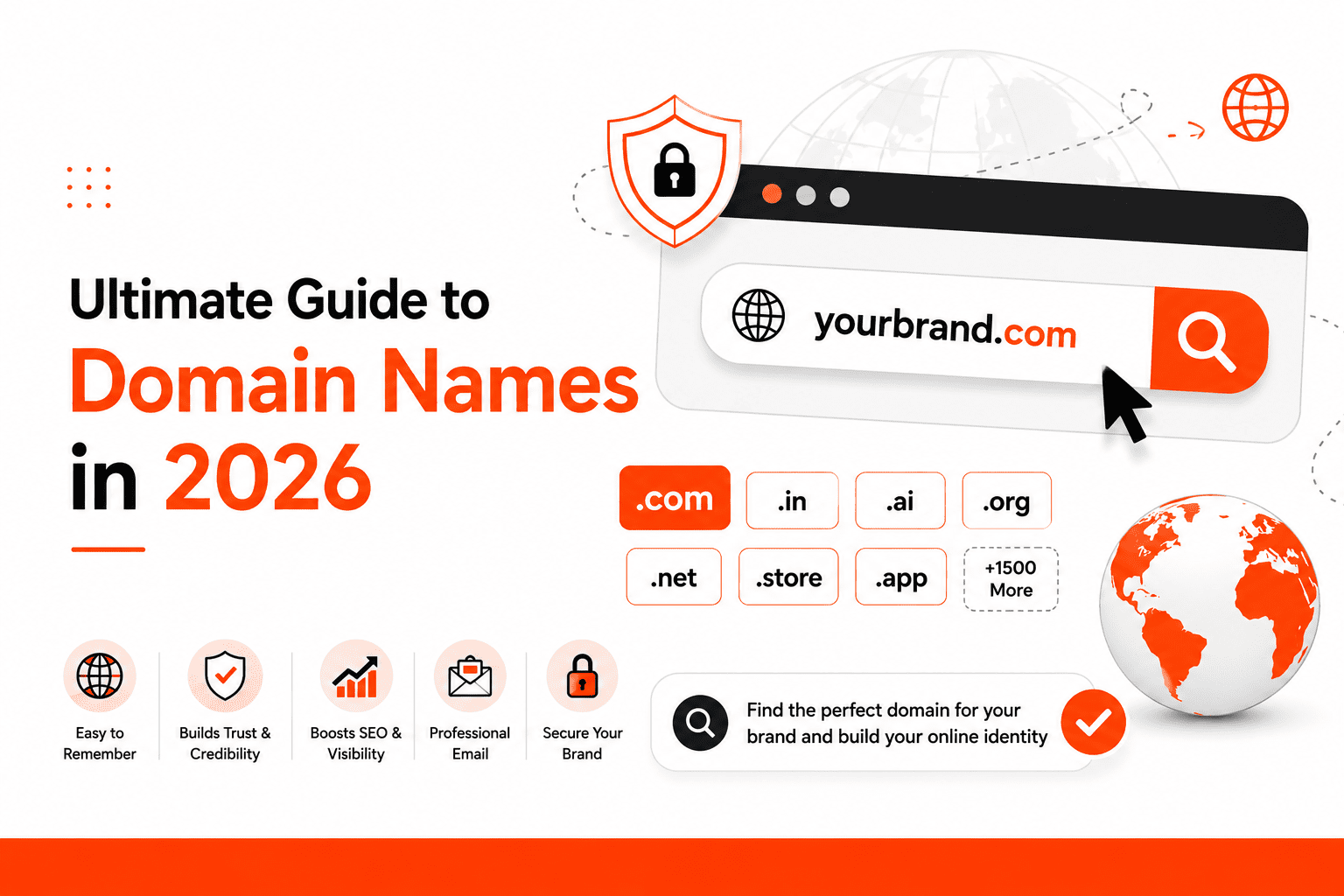
A domain name is more than a web address. It is the first thing people see in a browser, in email, on a business card, and in search results. It affects brand recall, professional credibility, email presentation, and how easily customers find and return to your site.
As of June 8, 2026, there were 392.5 million domain name registrations across all top-level domains globally, according to the DNIB Q1 2026 report. Good names get taken. Poor names cost businesses every day in missed trust and lost traffic.
This guide covers what a domain name is, how it works, which type fits which situation, how to register one, what it costs, how to protect it, and the most common mistakes that cost business owners time and money.
What Is a Domain Name?
A domain name is the unique, human-readable address that people type to visit a website — for example, google.com or thanksweb.in. It replaces the numerical IP address that computers use to locate servers, making websites easy to find and share.
Every website lives on a server. That server has a numerical IP address — a string of numbers such as 142.250.190.46. Nobody can remember or share a string like that. A domain name maps a readable word or phrase to that number so users can reach the site without ever seeing the underlying address.
Domain Name Example Breakdown
Take the address blog.thanksweb.in as an example. It has three parts:
- blog — the subdomain. It separates this section from the main site.
- thanksweb — the second-level domain. This is the brand identifier.
- .in — the top-level domain. This is the extension that ends the address.
Not all domains have a subdomain. Most root domains are formatted as second level .tld — for example, thanksweb.in or amazon.com.
Why Domain Names Are Easier Than IP Addresses
The technical address of every website is an IP address — a series of numbers assigned to the server hosting that site. IP addresses change when servers move, which makes them unreliable as long-term identifiers. Domain names stay consistent and point to the correct IP address even when the underlying server changes.
The system that handles this translation is called DNS. It runs in the background every time someone types a web address, so users never need to know the IP address behind any website.
How Does a Domain Name Work?
Domain Name and IP Address
When a browser receives a domain name, it needs to find the server that holds the website files for that address. It cannot connect directly to the domain name — it needs the IP address. The Domain Name System handles this lookup automatically.
The connection between a domain name and its IP address is set in the domain’s DNS records by whoever manages the domain. When those records change — for example, after a server migration — the updated address propagates through the DNS system within hours.
What Is DNS?
DNS stands for Domain Name System. It is the global directory that maps domain names to IP addresses. When a browser needs to find a site, it queries a DNS resolver, which checks its records and returns the correct IP address for the domain.
Think of DNS as a contact list. Instead of memorising a phone number, you look up a name and the system provides the number. DNS does the same thing for websites — look up the domain name, get back the server’s IP address.
Step-by-Step: What Happens When You Type a Domain Name
- You type the domain name into your browser.
- Your browser sends a request to a DNS resolver — usually one operated by your internet provider.
- The DNS resolver checks its records for the IP address linked to that domain.
- The resolver returns the IP address to your browser.
- Your browser connects to the server at that IP address.
- The server sends the website files back to your browser.
- The website opens.
This entire process takes under a second for most users. The DNS system handles billions of these lookups every day.
Main Parts of a Domain Name
Top-Level Domain (TLD)
The TLD is the extension at the end of a domain name. It is the part after the last dot. Common examples include .com, .net, .org, .in, .co.uk, .au, and .ai. The TLD is often the first element users notice when deciding whether to click a link.
ICANN — the Internet Corporation for Assigned Names and Numbers — oversees the system of TLDs and approves new ones. As of 2026, there are over 1,500 TLDs available, though most web traffic still flows through a small number of widely recognised extensions.
Second-Level Domain (SLD)
The SLD is the central part of the domain, positioned directly before the TLD. In google.com, google is the SLD. In thanksweb.in, thanksweb is the SLD. This is almost always the brand name, company name, or primary descriptive word for the site.
The SLD is the part of the domain that a business has control over at registration. The TLD is chosen at registration but regulated externally.
Subdomain
A subdomain is an optional prefix that appears before the SLD. Examples: blog.example.com, shop.example.com, support.example.com. Subdomains let large websites organise different sections under one root domain.
Not every website uses subdomains. Most small business websites consist only of the root domain — for example, yourcompany.com — with page organisation handled through folders and paths rather than subdomains.
Domain Name vs URL vs Website vs Hosting
Quick Comparison
| Term | What It Is | Example |
| Domain name | The address used to access a website | thanksweb.in |
| URL | The full address including the page path and protocol | https://www.thanksweb.in/seo-packages-india.php |
| Website | The pages, content, and functions that make up the site | Homepage, blog posts, service pages, contact page |
| Hosting | The server where the website files are stored | Shared hosting account, VPS, dedicated server |
Why People Confuse These Terms
Many providers sell domain names and hosting together in a single package. This bundling makes the two seem like the same product. They are separate. The domain is the address. Hosting is the storage space where the website’s files live. The website is the content itself.
A useful comparison: the domain is the street address of a shop. Hosting is the building. The website is the products and layout inside. You need all three for a complete website, but they are different things sold by different — or sometimes the same — providers.
Different Types of Domain Names
Generic Top-Level Domains (gTLDs)
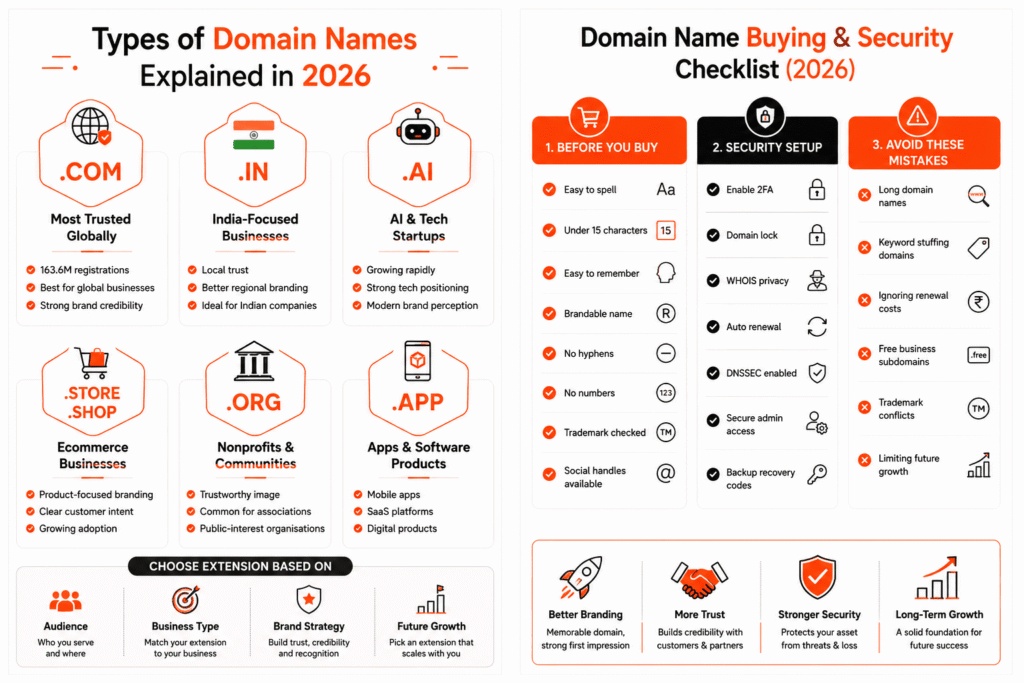
.com is the most widely recognised domain extension in the world, originally intended for commercial use but now used by all types of businesses, individuals, and organisations. .net was designed for network infrastructure but is now general-purpose. .org is traditionally used by non-profits and community organisations, though it is open to anyone.
For most businesses and individuals building a website for the first time, .com or a relevant country TLD remains the clearest and most trusted choice.
Country Code Top-Level Domains (ccTLDs)
.in for India, .uk for the United Kingdom, .au for Australia, and .ca for Canada are country-specific domain extensions. Using a ccTLD signals to both users and search engines that the website is primarily for visitors in that country.
For a business operating in one country with no plans to expand internationally, a local ccTLD can build country-level trust. An Indian business using .in communicates local presence clearly. Users who prefer to buy locally often respond better to a local domain extension.
New Generic Top-Level Domains (ngTLDs)
ICANN expanded the domain name system significantly, creating hundreds of new TLDs beyond .com and country codes. Examples in active use include .ai, .app, .store, .tech, .online, .site, and .shop.
According to the DNIB Q1 2026 report, new gTLD registrations grew 31.3% year over year as of March 31, 2026. Extensions such as .store and .shop are gaining traction in e-commerce. .ai has seen strong adoption from artificial intelligence companies and startups wanting to signal their focus immediately. These extensions work well when the name fits the brand naturally — not simply because the .com was unavailable.
Premium Domains
Premium domains are short, memorable, or commercially valuable names that registrars price significantly above standard registration fees. A domain such as loans.com or cars.com can sell for hundreds of thousands or millions of dollars.
Most small businesses do not need a premium domain. A well-chosen brand name registered at standard pricing is more valuable than a generic premium domain with no brand identity behind it.
Exact Match Domains (EMDs)
An exact match domain uses a target keyword as the entire domain name. Example: bestshoesmelbourne.com. The logic is that a domain matching a search query might rank better for that query.
This logic is largely outdated. Google does not give automatic ranking advantages to domains built purely to match a query. A domain that exists only to target a keyword, with no genuine brand identity behind it, often looks low-quality to users and to search engines. Brand-first domains consistently outperform keyword-only domains over time.
2026 Domain Name Trends You Should Know
Domain Registrations Are Still Growing
The global domain name market is competitive. According to the DNIB Q1 2026 report, there were 392.5 million domain name registrations across all TLDs globally as of March 31, 2026. Short, clear, brandable domain names in popular extensions get registered quickly. If a good name is available today, it may not be available next month.
.com Is Still the Most Trusted Extension
As of March 31, 2026, .com had 163.6 million registrations — by far the largest share of any single TLD (DNIB Q1 2026). It remains the default expectation for many users globally, particularly in business-to-business and e-commerce contexts.
If a preferred .com name is already registered, the right response is not to add hyphens, numbers, or extra words to force the .com. A clean brand name on .in, .co, or a relevant ngTLD is a stronger choice than a cluttered .com variation.
New gTLDs Are Growing in Adoption
New gTLD registrations grew 31.3% year over year according to DNIB Q1 2026 data. This growth shows that users are increasingly comfortable with non-traditional extensions when the brand behind the domain is credible and consistent.
Extensions worth considering for specific use cases: .store or .shop for e-commerce businesses, .ai for technology and AI-focused companies, .app for mobile applications and digital products, .online and .site for general web presence where .com is unavailable.
The ICANN 2026 New gTLD Application Round
ICANN opened a new application round for new generic TLDs with a submission window running from April 30 to August 12, 2026 (ICANN New gTLD Program). This round matters primarily to large brands applying for their own branded TLD — for example, a retailer applying for .brand — and to cities, community organisations, and industry bodies. It is not relevant to the average small business registering a domain. It does mean that new TLD options will continue to appear in the coming years as approved extensions enter the market.
Domain Privacy and Security Are More Important Than Ever
Domain names are digital assets. A domain that expires accidentally, gets hijacked, or has outdated contact information attached to it creates serious business problems. Recovering a lost domain is expensive and not always possible.
Security expectations have increased alongside the growth of domain abuse, phishing, and domain hijacking incidents. Treating a domain with the same seriousness as a bank account — with strong credentials, updated contact details, and active monitoring — is now standard practice for any professional website.
Does a Domain Name Affect SEO?
What Google Says About Keywords in Domains
Google has confirmed that words in a domain name can be one signal among many when evaluating the relevance of a page to a search query. However, Google also applies adjustments to prevent domains built purely to match queries from receiving unearned ranking benefits.
The practical implication: a keyword in your domain name does not guarantee a ranking improvement. A keyword-stuffed domain without content authority behind it signals low quality rather than expertise. Google’s ranking systems evaluate content relevance, trust signals, links, and user experience collectively — not the domain name in isolation.
| Choosing a domain purely to match a keyword is a short-term approach. Google’s system is designed to reward brands that demonstrate genuine expertise and helpfulness over time, not domains that appear to game relevance signals. |
What Actually Helps SEO More Than the Domain Name
The following factors have a far greater impact on organic search performance than the domain name:
- Relevant, well-structured content that matches what the user is searching for
- Internal linking that helps search engines understand the relationship between pages on your site
- Quality backlinks from trusted external sources in your industry
- Technical performance including page load speed, Core Web Vitals scores, and mobile usability
- Topical authority built through consistent, expert content published over time
- Trust signals including genuine reviews, accurate business information, and secure HTTPS
If your current website is not ranking well, the domain name is unlikely to be the cause. Working with an experienced SEO team to address content quality, technical issues, and link authority will deliver far more measurable improvement than changing or choosing a keyword domain.
Should You Add Keywords in Your Domain?
Use a keyword in your domain only when it sounds natural, reflects the brand genuinely, and does not restrict future growth.
- Good example: melbournedentalcare.com — the keyword is specific, the domain is readable, and it still allows a brand identity to develop around it.
- Poor example: best-cheap-dentist-melbourne-near-me.com — this reads as an attempt to rank for a phrase, not a brand name. It looks low-quality to users and does not build long-term trust.
The test: if a customer heard the domain name spoken aloud, would it sound like a real business? If the answer is no, the domain is working against the brand.
How to Choose the Best Domain Name in 2026
Keep It Short and Easy to Remember
Short domains reduce the chance of typos, are easier to include in offline marketing, and are more likely to be remembered after a single exposure. Aim for a domain under 15 characters where possible. If a name requires explanation to spell, it is too complex.
Make It Easy to Spell and Pronounce
If a customer heard the domain name spoken — in an advertisement, at a networking event, or over the phone — could they type it correctly the first time? Unusual spellings, silent letters, or words that sound like other words create friction. Every point of friction is a potential lost visit.
Avoid Hyphens and Numbers
Hyphens separate words in a way that reduces visual trust — hyphenated domains are associated with low-quality sites in many users’ minds. Numbers create ambiguity: does best4you.com use the number 4 or the word four? Either way, users will mistype it. Avoid both unless the brand specifically requires them and the audience already knows the name.
Choose the Right Extension
Use .com for a business targeting a global or broad national audience. Use a country TLD such as .in or .co.uk for a business focused on one country where local trust matters. Use a relevant ngTLD such as .store, .app, or .ai when the extension genuinely describes the product or service and the brand name is strong enough that the unusual extension will not confuse users.
Do not choose an extension based purely on what was available or cheapest. The extension is part of the brand.
Think About Future Expansion
A domain that is too narrowly defined by location, product, or service becomes a constraint as the business grows. A domain registered as ahemdabadplumber.com cannot scale to national plumbing services or adjacent services without the domain working against the brand. Build in room for growth at the point of registration — it is far harder to migrate to a new domain later.
Check Trademark and Social Handle Availability
Before registering a domain, search for the name at your country’s trademark registry. In India, the Controller General of Patents, Designs & Trade Marks provides a free search tool. A domain name that matches an existing trademark creates legal risk even if the registration process itself succeeds.
Check whether the social media handles — Instagram, LinkedIn, Facebook, and X — are available under the same name. Consistent naming across website and social platforms makes brand building faster and reduces user confusion.
How to Register a Domain Name
Step 1: Choose a Domain Idea
Start with the brand name if one exists. If not, consider combinations of: the service or product category, the primary audience, the location if it is a permanent part of the brand, or a memorable invented word that will work as a brand name. Generate several candidates before searching availability.
Step 2: Check Domain Availability
Use any domain registrar’s search tool to check whether the name is registered. Most registrars return a list of available alternatives when the exact match is taken — these suggestions are worth reviewing, as a slight variation may be better than forcing an unavailable first choice.
Step 3: Compare Extensions
Before buying a .com with added words to get around an unavailable first choice, compare .in, .co, or a relevant ngTLD. The cleanest version of the brand name on a secondary extension is almost always a better choice than a cluttered .com.
Step 4: Choose a Reliable Registrar
Not all registrars are equal. Compare these specific factors before purchasing:
- First-year price versus renewal price — they often differ significantly
- Whether WHOIS privacy protection is included free or charged separately
- The quality of DNS management tools
- Transfer policy — how easy and how expensive it is to move the domain later
- Two-factor authentication and domain lock security features
- Customer support availability and response quality
| Tip: Always check the renewal price before buying. A domain offered at ₹99 in year one may renew at ₹1,500 or more in year two. The renewal price is what you will pay for every year the domain is active. |
Step 5: Register and Enable Auto-Renewal
After completing the purchase, enable auto-renewal immediately. Domain expiry is one of the most common and most preventable ways to lose a domain name. When a domain expires, it enters a grace period during which the original registrant can still recover it, but fees increase. After the grace period, the domain enters a redemption period with significant recovery costs. After that, the domain becomes available to any buyer.
Many businesses have lost established domains simply by forgetting to renew. Auto-renewal removes that risk entirely.
Step 6: Connect DNS, Email, SSL, and Hosting
Registration is the first step, not the final one. After registering a domain, the following setup steps are required before the site is live:
- Point the domain to a hosting server by updating the DNS nameservers or A records
- Set up a professional email address on the domain — for example, contact@yourbrand.com
- Install an SSL certificate to enable HTTPS, which is now expected by both users and search engines
- Connect the domain to the hosting account where the website files are stored
If you need help connecting a newly registered domain to a website, the website development team at Thanksweb can handle the complete setup including DNS configuration, SSL installation, and professional email setup.
Domain Name Cost in 2026
What Affects Domain Pricing?
The price to register and maintain a domain name varies based on:
- The TLD — .com registrations typically cost more annually than .in or .net
- Whether the domain is designated as premium by the registry
- The registrar chosen — prices differ significantly between providers
- Whether WHOIS privacy protection is included or charged as an add-on
- Add-ons such as email hosting, SSL certificates, and domain forwarding
First-Year Price vs Renewal Price — The Trap to Watch For
Promotional first-year pricing is standard practice among domain registrars. A .com domain may be offered at ₹99 or ₹299 for the first year as an acquisition offer. The renewal price for the same domain from the same registrar is often ₹800–₹1,800 or more per year.
Before buying any domain, navigate to the registrar’s pricing page and check the renewal rate explicitly. A domain that costs ₹99 in year one but ₹2,000 from year two onward costs more over five years than one registered at a standard ₹900 per year from the start.
Are Free Domains Worth It?
Free subdomains offered by website builders — such as yourbusiness.wordpress.com or yourbusiness.wixsite.com — are suitable for testing, personal projects, and early-stage experiments. They are not suitable for a professional business website.
A custom domain signals ownership, stability, and credibility. Professional email on a custom domain performs better in deliverability and looks credible to potential customers and partners. The cost of a custom domain — typically ₹700–₹1,500 per year — is the lowest-cost investment a business can make in its digital presence.
Domain Privacy, Ownership, and Transfer
Who Owns a Domain Name?
Domain registration purchases the right to use a specific domain name for a defined period — typically one to ten years. It is not permanent ownership. ICANN’s rules require that domain registrations be renewed to maintain the right to use the name.
The registrant — the person or business that registers the domain — has control over the domain for as long as the registration is active and renewals are paid. Maintaining a current, accessible admin email address is critical, as renewal notices and transfer authorisation codes are sent to that address.
What Is WHOIS Privacy?
WHOIS is a public database that records the details of every domain registration. Without privacy protection, this record includes the registrant’s name, organisation, email address, and sometimes phone number and physical address.
WHOIS privacy protection replaces personal contact details in the public WHOIS record with the registrar’s proxy information. This reduces unsolicited email, phone calls from domain brokers, and potential misuse of personal contact information. Privacy protection is worth enabling on every domain — it is typically either free or costs a small annual fee.
Can You Transfer a Domain?
A domain can be transferred from one registrar to another at any time, subject to two standard restrictions: the domain must be at least 60 days old, and it must not have been transferred in the previous 60 days.
The transfer process requires: unlocking the domain at the current registrar, obtaining an authorisation code (also called an EPP or transfer code), and entering that code at the receiving registrar. Most transfers complete within 5–7 days. After transfer, the domain’s renewal schedule continues from the original expiry date, often extended by one year.
Common Domain Name Mistakes to Avoid
| Mistake | Why It Causes Problems | What to Do Instead |
| Choosing a name that is too long | Hard to type, prone to errors, difficult to remember | Keep the domain under 15 characters where possible |
| Using too many keywords | Looks spammy, limits the brand, reduces trust | Use one descriptive word at most, only if it sounds natural |
| Ignoring the renewal price | First-year promotions hide high ongoing costs | Check the renewal price before purchasing |
| Skipping auto-renewal | Domain expiry is easy to miss and expensive to recover from | Enable auto-renewal immediately after registration |
| Not checking trademark issues | A matching trademark creates legal risk | Search trademark registries before finalising the name |
| Using hyphens or numbers | Reduces trust, creates verbal and typing confusion | Avoid both unless the brand specifically requires them |
| Buying too many extensions without strategy | Unnecessary cost with no clear benefit | Register only the extensions customers are likely to type |
| Not securing key brand variations | Competitors or bad actors can register similar names | Register the main domain and one or two key variations |
| Using a free subdomain for a business site | Looks unprofessional, limits email credibility | Register a custom domain — it costs less than ₹1,500/year |
| Choosing a domain that limits expansion | Narrow city or service names become constraints | Choose a name that works if the business grows or changes |
Domain Name Security Checklist
A domain name is a business asset. Protecting it requires consistent attention to account security and access controls.
- Use a trusted, well-established registrar with a strong security track record
- Enable two-factor authentication (2FA) on the registrar account — this is the most important single security step
- Turn on domain lock (also called Registrar Lock or transfer lock) to prevent unauthorised transfers
- Enable WHOIS privacy protection to keep personal contact details out of the public record
- Keep the admin email address updated — expiry notices and authorisation codes go to this address
- Enable auto-renewal to prevent accidental expiry
- Enable DNSSEC (DNS Security Extensions) if the registrar supports it — this prevents DNS hijacking
- Restrict who has access to the DNS management panel
- Monitor the domain expiry date and set a calendar reminder 60 days before renewal
- Store recovery details — backup codes, admin email, and account password — securely and separately
| Note: Domain hijacking — where an attacker gains control of a domain by compromising the registrar account — is a real threat. Two-factor authentication and domain lock together prevent most hijacking attempts. Enable both immediately after registration. |
Domain Name Checklist Before Buying
Before completing a domain registration, confirm the following:
- Is it easy to spell from memory?
- Is it short — ideally under 15 characters?
- Is it memorable after hearing it once?
- Is it brandable — could a business identity grow around it?
- Does it avoid hyphens and numbers?
- Is the extension appropriate for the target audience?
- Is the renewal price acceptable for ongoing annual costs?
- Is the name free from trademark conflicts?
- Are the social media handles available under the same name?
- Is the chosen registrar reliable, with good security features and transparent pricing?
FAQs About Domain Names
A domain name is the address people type to visit a website — for example, google.com or thanksweb.in. It is a human-readable label that replaces the numerical IP address used to locate a server.
thanksweb.in is a domain name. So are google.com, amazon.in, and bbc.co.uk. The domain is the base address, without any page path or protocol prefix.
The domain is the base address — thanksweb.in. A URL is the full address including the protocol and page path — https://www.thanksweb.in/seo-packages-india.php. Every URL contains a domain name, but a domain name is not the same as a URL.
The domain is the address. Hosting is the storage space where the website’s files live. A customer types the domain to visit the site; the hosting server holds all the pages, images, and code that make up the website.
.com remains the most widely trusted extension globally. For businesses operating in India, .in builds local credibility. For tech companies and startups, .ai and .app are gaining acceptance. The best extension is the one that fits the brand and the target audience — not the one that was cheapest or most available.
.com had 163.6 million registrations as of March 31, 2026 and remains the most recognised extension. It is still the strongest choice for global businesses. For specific industries or local businesses, a country TLD or new gTLD can be equally or more effective.
Keywords in a domain name can be one minor relevance signal. They do not guarantee rankings. A domain built only to match a keyword, without genuine content authority, performs worse than a branded domain backed by strong content and trust signals. Brand first, keywords second.
A domain name cannot be edited after registration — you would need to register a new domain. Migrating a website to a new domain is possible with proper 301 redirects but carries short-term SEO risk. The right domain at the time of first registration avoids this problem.
After expiry, most registrars offer a grace period of 15–30 days during which the original owner can renew at the standard rate. After that, the domain enters a redemption period with recovery fees of ₹3,000–₹8,000 or more. After the redemption period, the domain becomes available to any buyer. Enable auto-renewal to avoid expiry entirely.
No. Domain registration purchases the right to use a name for a set period — typically one to ten years. Ownership continues only as long as renewals are paid on time. There is no permanent domain ownership option under ICANN’s current rules.
Register the one or two extensions customers are most likely to type. For most businesses, that means the .com and the country TLD — for example, yourbrand.com and yourbrand.in. Buying every available extension is unnecessary cost without proportional benefit.
WHOIS privacy replaces the registrant’s personal contact details in the public WHOIS database with the registrar’s proxy information. It reduces spam, unsolicited contact from domain brokers, and potential misuse of personal information. Most registrars include it free or at minimal cost.
Final Thoughts: Choose a Domain Name for Brand, Trust, and Long-Term Growth
A domain name is often the first element of a business’s digital presence and one of the last things changed. The right choice at the point of registration removes years of potential friction — in marketing, in brand building, and in technical management.
A good domain name is short, easy to spell, memorable, appropriate for the audience, free of trademark conflict, and chosen with future growth in mind. The extension matters, but it matters less than the clarity and credibility of the name itself. Security and renewal management matter as much as the initial selection.
Before registering, run through the buying checklist in this guide. Compare the renewal price, not just the first-year promotion. Enable privacy protection and auto-renewal on day one. Treat the domain as the business asset it is.
| Need a website to go with your new domain? Once the domain is registered, the next step is building the website. Thanksweb designs and builds professional websites for Indian businesses, connecting domain, hosting, SSL, and email from start to finish. Explore our website development services or use the Website Cost Calculator to get an instant estimate. |

Kishan Jadav is the CTO of Thanksweb Marketing Pvt. Ltd. With expertise in Technical SEO, Local SEO, web development, and digital strategy, he helps businesses boost online visibility, organic traffic, and leads through data-driven marketing.